MVC Architecture in Salesforce
Chapter Topics
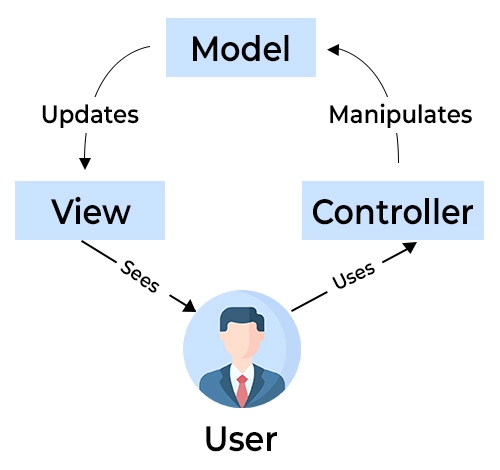
Ever wonder how Salesforce organizes things? Look at the Model-View-Controller (MVC) architecture in Salesforce. Here’s the gist: the Model handles your data (think leads, contacts, opportunities), the View crafts what users see (web pages, reports), and the Controller manages user interactions (button clicks, form submissions).
This separation keeps things clean, efficient, and easier to maintain, ensuring a smooth Salesforce experience for everyone. Below, we have the MVC architecture explained in detail.
What is MVC Architecture in Salesforce?
Model-view-controller (MVC) Architecture in Salesforce is a software pattern that separates information representation from user interaction. It divides the application into three manageable parts.
Modules in Salesforce MVC Architecture
The Salesforce MVC architecture pattern contains three modules:
1. Model (Database Layer)
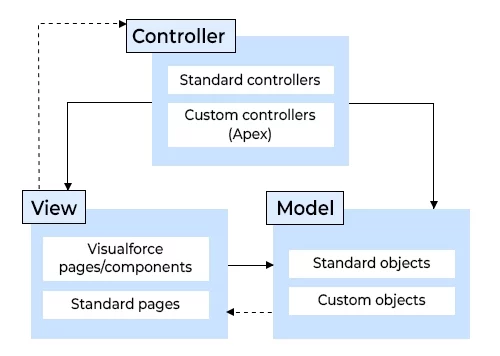
The model layer in Salesforce represents the data structure and business data of the application, defining how data is stored, related, and organized. Salesforce objects, known as sObjects, serve as the Model in the Model-View-Controller (MVC) architecture.
Each entity in Salesforce is mapped to an sObject, which can be any object that can be stored in the Salesforce platform database. It is a data model for all the objects, which helps us understand the relationship between them and each of their fields.
2. View (User Interface Layer)
The view layer is responsible for the UI, the schema representation, and the display data. It uses Visualforce(formerly), now more inclined to Lightning Web Components, Aura Components, and Lightning App Builder pages. It helps present the data to users, enabling them to modify it, and also determines how the UI will look.
3. Controller (Business Logic Layer)
Controllers perform actions whenever users interact with Visual Force. They contain all the business logic, such as APEX classes, that help us communicate with the database from the UI. The Controller transfers a command to the Model to update itself.
In SFDC:
- Visual Force pages, Page Layouts, and Tabs are part of the View Layer of Model View Controller in Salesforce.
- Workflows, Apex Classes, and Triggers come under the Controller part in the Model View Controller in Salesforce.
- Objects, Fields, and Relationships come under the Model Layer of the Model View Controller in Salesforce.
How Does the Salesforce MVC Architecture Work?
Any request for an application in SFDC goes through a process in the Salesforce MVC Architecture. The following are the steps :
- First, the user will request the view.
- The view generates the user interface,
- Once the request reaches the controller, the route configuration is checked.
- After checking the configuration, the request is passed on to the Model for further checking.
- The Model processes the request and generates a response, which is then passed back to the controller.
- Once the result is generated, it will be reverted to the controller, which then forwards it to the view layer for final output.
Features Of Salesforce MVC Architecture
Here are some of the features of Salesforce
- Salesforce MVC Architecture provides the ability to write unit tests independently for each layer.
- The parallel development allows UI and backend teams to work simultaneously.
- Standard Controllers in MVC architecture reduce code duplication for common CRUD operations.
- The Custom Controllers allow complex business logic beyond standard functionality.

Benefits of Using Salesforce MVC Architecture
Some benefits of the Salesforce Model View Controller Architecture are given below:
1. Reliability
The layers have clear separation, which allows for excellent reliability if we want to change any layer. For example, we can change the look and feel of an application without recompiling the Model or Controller code.
2. High Reuse and Adaptability
MVC provides multiple types of views, all accessing the same code, which makes it adaptable for new users. The multiple-view representation can share the same controllers and model logics.
3. Very Low Development and Life Cycle Cost
It makes it possible to develop and maintain user interfaces when front-end developers focus on the view layer and backend developers work on controllers. Development time can be significantly reduced because Controller programmers focus solely on transactions, and view programmers focus exclusively on presentation.
4. Easy to Maintain
The separation between layers makes it easier to maintain, test, and deploy apps with the help of the MVC Architecture in Salesforce.
Next ChapterNeed more support?
Get a head start with our FREE study notes!
Learn more and get all the answers you need at zero cost. Improve your skills using our detailed notes prepared by industry experts to help you excel.